What Can AI Actually Do for You?
AI won’t save you. But it might free you up?
Long story short: Nobody's being helped by you spending four hours on a PowerPoint; AI should be doing that (and other tasks) for you so that you have more time and space for the work that actually requires you to be human. Check out Meg's AI Starter Kit for ways to gradually build your AI practice.
I have a love/hate relationship with AI.
For a long time, I avoided it completely. My former business partner kept saying "AI is our thing" and I just kept responding, "It's YOUR thing." I believed that people were at the core of everything. Technology was a tool, not a way of being — and I wasn't interested in making it central to how I worked.
Then I started Helia. I had planned to build it with a partner and had sold enough business for two humans. When their life plans changed, I found myself completely alone in my house doing two times the work I had capacity for. I felt isolated and grumpy and kind of scared about what I had gotten myself into — and that I was going to hate it.
After what felt like forever (probably a few weeks!), I realized I had agency to improve my situation. So, I started tracking everything I was doing. What I hated and was procrastinating on and avoiding. What I loved and jumped into.
Then I organized the list into two categories:
Work that needed a great human to lead, whether me or someone I brought in (like building a nuanced financial model for a new healing center)
Work that I could leverage AI to get done (researching potential funders, creating presentations, editing).
Most of the things I hated doing (slide decks!!!) were perfect to hand off to AI. I was also able to hand off half of the tasks I was procrastinating! The other half truly required a human to lead the work and I didn’t have the expertise (hence my procrastination). So, I brought in experts — each of whom became members of the Helia Collective.
Everything I loved and jumped into? That stayed on my plate, and happily so. Since then, I haven't looked back.
When I look out at the sector and see folks using AI intentionally and thoughtfully, it is INCREDIBLE what they've been able to do. And like all things, there are slippery slopes and places to pay attention.
Here's the thing: most of us take on too much. We do it because the world evolves and humans and communities need new things. Because we are busy. Because we need to make money to live our lives. Because we’re trying to create a better world while living our dream lives, we're doing a million things at the same time and not doing any of them particularly well.
AI is a chance to change that. To get to spend most of our time on the work that requires us to be human — the stuff we're great at, the stuff that matters. And in the process of using it intentionally, we're also training it. Making sure it learns from our world, not just the startups and corporations who got there first.
That's what this piece is about: using AI to reclaim space for the work that actually requires us to be human.
Someone who is good at making AI work for them
Meg McGilvra is Director of Provider Partnerships at Year Up United, where she partners with community colleges, nonprofits, and workforce boards to get better outcomes for students — particularly young adults who've been underestimated by traditional systems.
She used to spend her days doing what a lot of us do: meetings, emails, PowerPoints, follow-ups, coordination, documentation. The important work — sitting with a partner and designing something together, being in a room with students, building relationships that lead to real outcomes — that's what she's great at. That's what matters. But it often got crowded out by everything around it.
"I was tired of doing everything and knowing I wasn't really great at anything and I wanted to be really great at the things I knew I was great at again."
That's where AI came in for Meg. Not as a way to do more. As a way to focus on what actually matters.
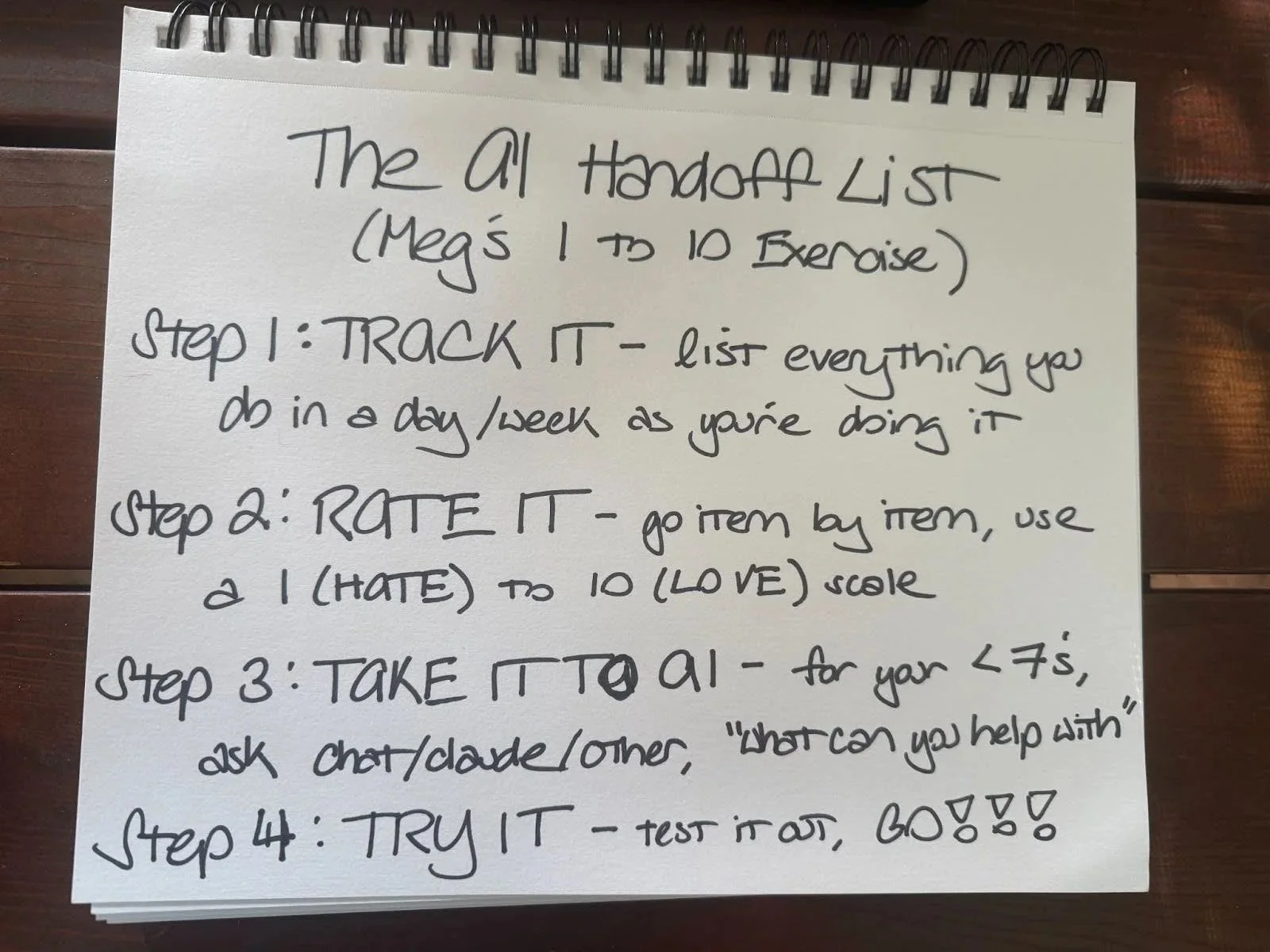
Her approach is disarmingly simple: rate everything you do 1-10 on what brings me joy, take anything below a 7 to AI, and ask it what it can help with. That's it. No chasing tools. No complicated systems. Just a clear filter for what deserves your energy — and what doesn't.
"Nobody's being helped by my spending four hours on a PowerPoint or rewording an email for 30 minutes. I have a lot of gifts and I'd like the space to share them. My goal is to be as human as I possibly can be."
Think about it: what's most important in your work? For Meg, it's being with partners and clients — the actual relationship work that leads to outcomes. But there's SO much around that. Filling out paperwork. Preparing summaries. Answering the same questions about products over and over. Creating decks that communicate what she already knows. None of that requires her specific gifts. But it takes up the space where those gifts could live.
AI is a chance to reclaim that space.
And here's the piece that makes Meg different from a lot of AI content out there: she's thinking about what this means beyond her own productivity.
"We have an chance to use AI to either make the opportunity divide three times as large or close it two times as fast."
The social sector is already trying to do more with less. If we can actually use AI to be more effective — to focus on what matters, to stop drowning in the stuff that doesn't require a human — we can do what we've always been trying to do. Create more impact with the limited resources we have.
AND — and this is the part Meg keeps coming back to — in using it, we're training it.
She talks about a woman she follows who believes our job as social justice people is to train AI. "If you write 'show me an image of a professional person' and it gives you a white male, then you need to tell it, ‘No, that's not what it looks like’ — because it's learning from you. It's our social responsibility."
If we're not in there using it, shaping it, telling it when it's wrong — it learns from whoever is.
The Key Takeaway
AI is about efficiency — and when used well, this creates space to be more human. Space to do more with the less we already have (especially in the social sector and start-ups!). AND, we have an opportunity - and perhaps an obligation — to make sure AI becomes something that represents the world we actually live in — and want to create.
If you’ve been reluctant to adopt AI, we get it. There are good reasons to be skeptical, and we know first hand that changing habits and learning new tools is hard. AND, Meg’s Gradual AI Adoption Process gives you a path forward.
Meg’s Gradual AI Adoption Process
If you're a "just tell me what to do" kind of person (aka Helia's COO, Libby), check out Meg's Life Scan Exercise in our AI Starter Kit — it walks you through the whole approach step by step.
If you're a "tell me why this works" kind of person (aka Helia’s Founder, Jess), read on. Here's what we're going to cover:
Start with images — this is how you actually learn to prompt (Meg teaches her kids this way)
Do the life scan — track everything, rate it, take the stuff below 7 to AI
Partner with AI to find what's possible — instead of chasing tools, ask AI what it can help with
Use the Projects feature for context — the most important way to use ChatGPT or Claude
Build bots for specific needs — when you need something that serves your whole team
Step 1: Start with Images
This might sound like a weird place to begin, but Meg is adamant: image generation is the best way to learn how to use AI.
Not because making images is the most useful thing AI can do for your work. But because it teaches you the fundamental skills — prompting, iterating, giving feedback, adding context — in a low-stakes way where you can actually see what's happening.
"The way that you have to prompt images is what prompting is. I don't need to sit down and teach you how to build a prompt. I need you to ask questions. I need you to discern information. You need to be able to put context in. That's it. And I really feel like image generation gives you such an advantage to that."
Meg teaches her seven and nine-year-old this way. She has them do it. Her team does it. It's where everyone starts when Meg is showing them how to use AI.
"We play 'let's make an image.’ I ask them, ‘What's the thing in your head that you wished existed in the world?’ And they grab my phone and they're like, 'I want to see a purple unicorn that has a mermaid tail swimming in the ocean.'"
Her youngest is all about mermaids. So she asks, “Can I see a mermaid riding a horse in the ocean?” And then she gets the image back and makes a face: "That mermaid doesn't have this and it doesn't have this and it's missing this."
And Meg tells her: "Then your question wasn’t good enough. You need to ask better questions."
So she asks again. With more detail. Until she gets what she actually wanted. And then Meg says: "Okay, next time, start with all of that."

Example of what my tiny humans create, because why not a penguin and bunny combine
That's it. That's how you learn to prompt. That's how you learn to dialogue with AI. That's how you learn that your first attempt won't be right, and that's fine — you just need to give it better information.
And here's the thing — this isn't just about getting better at AI. It's about training it. Every time you tell it "no, that's not what a professional looks like" or "that's not what my community looks like," it learns. If we're not in there doing that, someone else's version of the world becomes the default.
Pro tip: First, get the paid version. Seriously. The free versions are wildly different from even the lowest-level paid tier. We promise.
Step 2: Do the Life Scan
Once you've got the basics of prompting down, it's time to get intentional about what AI should actually help you with.
This is Meg's signature move. And it doesn't start with tools or apps or the latest thing someone's promoting. It starts with you. She calls a life scan.
"One day I listed everything I did as I was doing it and rated it 1 to 10. 10 meaning I thought it was the most fun thing in the world. 1 being like I wanted to die while I did it because it was so uncomfortable and terrible."
She tracked everything. As she did it. For a full day.
Then she rated it all. And at the end of the day, she took everything that was lower than a 7 and asked: Which of these could I make AI do?
She asked ChatGPT and guess what: PowerPoints were on the list of things it could help her with. She hasn’t made a slide deck from scratch since!
The life scan isn't a one-time thing, either. Meg has a weekly prompt she uses: "What did I do this week that I could have done faster or easier by using a better prompt?" She reviews that feedback and decides whether she needs to build a bot, create a project folder, or just use that prompt going forward.
Step 3: Partner with AI to Find What's Possible
Here's where most people go wrong: they start Googling tools. They sign up for every new AI thing that shows up in their inbox. They see an ad and think, "Maybe that's the one that will finally work."
Meg does the opposite.
After her life scan, she doesn't go searching for tools. She goes back to ChatGPT (or Claude, or whatever her primary AI is) and asks it to help her figure out what's possible.
"I didn't start searching for tools. I went into ChatGPT and said, here's what I'm struggling with — what are the ways you could help me? And then it would also tell me, 'Hey, there's this tool that does X specifically, you might want to check that out.'"
So instead of chasing every shiny new app, you're partnering with AI to identify the possibilities and then testing them out. You're not signing up for everything. You're not drowning in trials and subscriptions. You're letting AI help you navigate what actually exists and what might be worth your time.
This is especially important in the social sector, where we don't have unlimited resources to throw at the tool-of-the-week. If we're not using AI because we don't have the resources, but if we used it, we'd have more resources... "it becomes the barrier and solution almost at the same time."
That's the opportunity divide that Meg keeps coming back to. We have to be strategic about this. And being strategic means not chasing — it means asking strategically.
Step 4: Use the Projects feature for Context
This is the most important way to use ChatGPT or Claude, according to Meg. More important than fancy prompts. More important than bots. If you do nothing else after the life scan, start using the Projects feature.
"These days I build a lot of project folders. I think they're just as good as bots if you don't need to code."
So what's a project?
A project is a dedicated space (similar to a folder) where you load all the context AI needs to actually help you well. Your writing samples. Your style guide. Background documents. Examples of what good looks like. The specific thing you're working on.
When AI has your context — your voice, your examples, your specific situation — it can do so much more than when you're starting fresh every time.
Think about it: every time you open a new chat, you're starting from zero. AI doesn't know who you are, what you're working on, what you've already tried, or what "good" looks like in your world. A project holds all of that. It's like the difference between explaining your entire job to a child versus working with someone who works in your industry.
When might you make one?
A recurring type of work (weekly reports, board communications, partner emails)
A specific initiative (a grant proposal, a new program launch, a strategic plan)
A role you play (manager communications, stakeholder updates, team training)
A body of knowledge you reference often (your organization's programs, your theory of change, your key partnerships)
How many do you need?
It depends on how varied your work is. Meg has multiple — some for ongoing work, some for specific projects. The key is that each one has its own context loaded in, so AI knows how to help you in that specific space.
And here's what matters for the bigger picture: when you load your context into projects, you're also shaping what AI learns about your work. Your programs. Your communities. Your language. You're making sure that when AI helps you, it's helping from a place of actually understanding your world — not some generic corporate default.

Always happier in or near water!!
Step 5: Build Bots for Specific Needs
Once you've got Projects working for you, you might want to take it further with bots. But here's Meg's take: Projects are for most things. Bots are for when you need something that serves your whole team — or when you're answering the same questions over and over.
The most helpful bot Meg described wasn't for her personal productivity. It was for her organization.
Year Up has a product called Career Connect — a college program that's essentially a "diet version" of what most people know Year Up for. It helps colleges add essential skills training on top of any industry and connect students to employment or internships.
"What's crazy is the amount of calls I get about the product. Somebody will call me like, 'How many lessons does it have? What does this have in it? Who's funding it?' And that's common in nonprofits, right? You design something, you're implementing something, but not everyone knows everything about the product or the intervention or the new funding you just got that's got 500 pages that nobody ever read. Maybe you did a PowerPoint one time, but nobody remembered it."
Sound familiar?
So they built a bot.
"We made a bot that has all of that as knowledge files… and our team can ask it anything it wants about the product."
They loaded in everything: the rollout decks, the contracts, the product specs, the funding details. All the stuff that lives in documents nobody can ever find when they need them.
The result? "It saves me as the product person a ton of time because I'm not answering questions all the time. I'm like, 'Hey, check with the bot. Everything you need is in there. It's fine.'"
And here's the piece Meg loves most: "It gives people agency. It's like, you don't need to go into a room of funders or students or partners and make something up." People can actually get the information they need, when they need it, without waiting for someone to respond to an email or hoping they remembered the details from a presentation three months ago.
That's not just efficiency — that's changing how knowledge moves through an organization.
When to build a bot instead of a project:
When multiple people need access to the same information
When you're getting the same questions over and over
When you have documents (rollout decks, contracts, product specs, funding details) that could answer questions if people could just find them
When you want to free up your team's time AND give others the ability to self-serve
How to make this work (Meg's grounding principles)
Throughout our conversation, Meg kept coming back to a few grounding principles. Things she's learned the hard way. Things she wishes someone had told her.
Talk to it like an intern.
"Be kind. Thank it. Be respectful. You don't go like 'go build me a marketing plan' to a new marketing intern."
You wouldn't dump a massive project on a first-day intern with no context. Same thing here. Be specific. Give background. Ask for help with one piece at a time.
The bot is good at ONE thing.
"We're all humans, right? So we're like, 'and I want you to add this' — stop."
Keep it simple. One thing at a time. Don't try to make AI do everything at once.
It can’t read your mind.
"It's coming with a decent amount of knowledge. It's got some solid life experience and it can reach. But it's still without the right context, it's gonna give you something ridiculous."
That's why projects and context matter so much. AI is getting smarter, but it still needs you to set it up for success.
Don't call the human stuff that you now have time for “soft skills.”
"If someone calls them soft skills, I will lose my shit on you. Because in this world, the only thing that's soft is the technical skills you're learning in your industry."
The human skills — communication, empathy, leadership, judgment — those are the hard ones. And AI can help us have more time for them. That's the whole point.
When to Do This Yourself vs. Bring Someone In
The life scan, the projects, the bots — all of that you can start on your own. And Meg's AI Starter Kit is a good place to begin.
If you get stuck — or if you're thinking about what this means for your whole team, not just yourself — Meg McGilvra is happy to connect. She runs informal AI lunch-and-learns at Year Up and loves the kind of peer consultancy where everyone comes in with a use case and leaves with ideas.
She's a good fit if:
You've started experimenting with AI but keep getting generic, unhelpful outputs and can't figure out why
You want to think through AI strategy at the team or organizational level — not just personal productivity
You're wrestling with the equity implications of AI in your specific context
You want to talk to someone who's actually doing this work inside a nonprofit, not someone selling a course about it
Ready to connect? → Email Meg at mmcgilvra@yearupunited.org with subject line “Helia Help.”
Not sure who's the right fit? Book 30 minutes with Helia and we'll help you figure out who in our Collective might be.
Try it Yourself
Meg’s AI Starter Kit:
The AI Handoff List: Megs 1-10 Exercise— Track everything, rate it 1-10, take your below-7 list to AI
Build Your Own AI Bot — Step by step process to build your own bot in ChatGPT
People Meg follows + learns from:
Lori Mazor — CEO of SYNTHETIVITY and author of TEMPERATURE: Creativity in the Age of AI. Runs the "Humans of AI" newsletter and believes it's our responsibility as social justice people to train AI. Newsletter ← She also offers bootcamps for teams wanting to go deeper.
Jordan Wilson — Host of the Everyday AI Podcast, a daily livestream, podcast, and free newsletter for everyday people learning AI. Practical, not overly technical.Newsletter + Podcast ← He also offers courses and training.
Questions to sit with
What are you spending hours on that nobody's actually being helped by?
If you tracked everything you did today and rated it 1-10, what would fall below a 7?
What gifts do you have that you'd like more space to share?
What's the actual work that requires you to be human — and how much of your time does it actually get?
How might AI help you be more human, not less?
What's your role in making sure AI learns from your world — your communities, your programs, your language?
About the Contributor

“My face… yes.
My smile… yes.
Eight hours of sleep and studio lighting… powered by AI.
Meg McGilvra is Director of Provider Partnerships at Year Up, where she partners with community colleges, nonprofits, and workforce boards to get better outcomes for students who've been underestimated by traditional systems. She teaches her seven and nine-year-old to prompt by making purple unicorns with mermaid tails. She built a bot so her team would stop emailing her questions about products. And she will absolutely lose her shit if you call them "soft skills."
This article comes from a coffee chat with Meg in January 2026. These conversations form the heart of the Helia Library — because we've learned the most from doing and from talking with other doers willing to share their wisdom. We don't need to start from blank pages or do everything alone.
As always, take what's helpful, leave what's not, and make it your own.
Article & Resource Tags