Long Story Short
Most cyberattacks are run like a business, which means that if you want to stay off the radar of hackers, you need to keep up with consistent cybersecurity basics. Check out New Harbor’s “Top 8 Things to Protect Yourself” in our Cybersecurity Toolkit if you want to start today.
How to Jump!
Jess here!
Okay, let’s be real about cybersecurity for a second.
It feels both really far away (it’ll never happen to me!) and also terrifyingly close (oh, god, what if it’s happening right now). Most of us have been told at least once to turn on multi-factor authentication, and a lot of us nodded, found it mildly annoying, and moved on.
When a family member’s company got hacked, what struck me most was how business-like the whole thing was. Basically: “We’re holding all your stuff hostage for $X by X time. Just pay up and you’re good!”
It’s an oddly effective model. (Also: wildly stressful.) They paid. Life moved on. But I couldn’t stop thinking about how many organizations I knew that would be just as vulnerable — and way less equipped to respond.
Then at Think of Us, I remember the moment right before we announced a huge project that came with huge dollar amounts — when our funding was about to become very, very public — and realizing just how much sensitive data we held on young people in the foster care system who trusted us. I was SO grateful we had a senior tech leader to manage it, because I knew most orgs our size didn’t have that luxury.
Cyber-insecurity is a reality of our world. So when you find people who genuinely care about cybersecurity and can make sense of it, who don’t require twenty steps just to log in, you share them. That’s what this article is about.
Most people think it’s all shadowy hackers in hoodies. But the reality? It’s run like a business.
The people who convinced me this doesn’t have to be scary
When I first connected with Giuseppe Morgana and Jonathan Edward of New Harbor Security, I’ll be honest: I was skeptical that a cybersecurity conversation wasn’t going to make my eyes glaze over or send me spiraling into a panic about everything I was doing wrong.
That didn’t happen.
Giuseppe spent years in government doing compliance work. Securing systems, disabling inactive users, and maintaining a real inventory of what apps an org was actually using. He started the state of New Jersey digital team and realized that what he’d always done “on the side for fun” was actually a massive, complicated undertaking that no small organization could manage alone. “If we don’t make this easier,” he told me, “how are we going to actually raise the bar on cybersecurity for nonprofits and small organizations that don’t have security teams?”
Jonathan came from Google, the first company he’d ever worked at where security actually made him more productive. “It just worked, and I didn’t have to think about it.” Then he’d seen the security questionnaires Google sent to its vendors. Hundreds of questions. An entirely different language. That gave him an idea: what if someone could take what Google had figured out and make it accessible to the organizations that needed it most?
So Giuseppe flew west to drag Jonathan to a cybersecurity conference called RSA and, eventually, the pair founded New Harbor.
What makes New Harbor different, and why I wanted to share them with you, is that they handle security AND compliance together. So when a funder, partner, or government contract sends you the dreaded security questionnaire (the average is 150 questions, they’ve seen up to 400), New Harbor can actually answer it, because they know exactly what your systems are doing. They’ve taken the thing that normally derails a nonprofit’s whole week and made it someone else’s problem, in the best way.
And maybe most importantly: these are the people you’d actually want to text if something sketchy popped up on your screen. (They’ll probably text back right away.)
The Key Takeaway
When I asked Giuseppe and Jonathan what most people get wrong about cybersecurity, they both smiled.
“Most people think it’s all shadowy hackers in hoodies,” Giuseppe told me. “But the reality? It’s run like a business.”
There are attack groups with Slack channels, customer service teams, and even holiday schedules. Their goal is almost always money, and the easiest path to it. “These groups are run just like any other business,” Jonathan told me. “They don’t care about you specifically. It’s really just: we are running a business, we have access to your data, and we can monetize that.” Giuseppe added, without missing a beat: “It’s not personal.”
A hacker might look at a thousand organizations in a day, but if your basic systems are locked down, they’ll move on to someone easier.
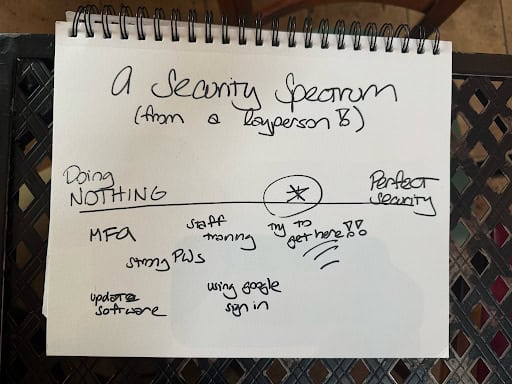
Here’s what that means for you: they’re not targeting you. They’re scanning for the path of least resistance. A hacker might look at a thousand organizations in a day, but if your basic systems are locked down, they’ll move on to someone easier. Getting from zero to 80% protected stops most threats. You don’t need perfect security. You need to be harder to attack than the next org on the list.
That’s actually doable.
New Harbor’s Top 8
If you’re a “just give me the list and I’ll get started” kind of person (aka Helia’s COO Libby), New Harbor’s “Top 8 Things You Can Do to Protect Yourself” in our Cybersecurity Toolkit is exactly that. Eight things. Most of them are free. Do them.
Here’s what’s on it:
- Turn on multi-factor authentication everywhere, not just Gmail
- Stop reusing passwords
- Use strong passwords (16+ characters, or a random passphrase of 4-7 words)
- Check who actually sent that email before you click anything
- Pause before acting when something creates urgency
- Avoid clicking links in unexpected emails or texts
- Update your software when it prompts you
- Use Google Sign-In or Microsoft Sign-In where you can
If you’re a “tell me why these things actually matter” person (aka our Founder Jess), read on!
How these habits actually protect you
Step 1: Start with MFA — and actually do it everywhere
Jonathan was unambiguous: “Multi-factor authentication [also called two-factor authentication or 2FA] is the single most impactful thing you can do for security.” And the most common mistake? Turning MFA on for your email and calling it good. “I put MFA on my Gmail. I’m good. Well, no. You also have Slack. You have all these other apps.”
Here’s why it matters so much: one of the most common attacks Giuseppe sees is password reuse. An attacker finds a leaked password from some random forum — and these leaks happen constantly — then just… tries it everywhere. Your project management tool. Your Slack. Your email. If any of them use the same password, they’re in. MFA stops that chain even if the password gets out, because they still can’t access your account without a second verification.
→ Start here for Google Workspace:
- Have team members run a Google Security Checkup
- Enforce multi-factor authentication for your whole org (you’ll need admin access — here’s a setup guide; we recommend a one-week grace period)
- For orgs holding especially sensitive data, consider enrolling in Google’s Advanced Protection Program
Step 2: If something happens, pause before you do anything
This is one I find genuinely reassuring: when something goes wrong, the worst thing you can do is panic and act fast. That’s exactly what attackers count on. “In those moments of chaos,” Giuseppe told me, “they may try to email you and say: click this link — it’s going to help reset your password. And you’re like, this is it, I’ll be able to stop the attack. When really, that’s just another way for them to gain more access.”
Here’s what to do: stay calm, step away, and call someone who actually knows what to do.
“Just taking a breath so that you don’t make the problem worse is really important.” Most incidents aren’t catastrophic if you respond thoughtfully. They become catastrophic when people panic and click the wrong thing.
Also, this is actually wild, but if you do get a ransomware note, you can often negotiate. These groups have a reputation to maintain in their own networks. “They’re thinking, If I go back on my word after you pay me,” Giuseppe explained, “when I go to ransomware someone else, how are they gonna trust my word enough to pay?” Fascinating in the most unsettling way possible.
You don’t need perfect security. You need to be harder to attack than the next org on the list.
Step 3: Think about what data you’re actually holding, and what you could let go of
This one surprised me the most. A lot of what Giuseppe and Jonathan recommend isn’t about adding protection. It’s about reducing what’s there to protect in the first place. “If you don’t have the data, you don’t have to protect it.”
Nonprofits tend to collect sensitive information early and often — program data, financial info, health notes, immigration status, prior incarceration, foster care history — and hold onto it long past when they need it. The risk isn’t always obvious. Even names and emails can be damaging when paired with an affiliation. If someone could look at your database and connect these 400 families to a program supporting people in recovery, or incarcerated people looking for work, or foster youth, that’s sensitive information the people you serve didn’t consent to having public.
Jonathan’s gut check: the “New York Times test.” If anything about your org and the data you hold was published tomorrow, how bad would it be? Not just for you but for the people whose information you’re holding?
Practical steps: look at your email retention settings. Your Slack or Teams retention policies. Any databases you’re maintaining. Ask: do we actually need this data? If yes, for how long? If no, get rid of it.
A word about AI
The reason cybersecurity feels louder right now is partly real and partly hype. Here’s what Giuseppe and Jonathan actually said:
The real part: AI makes attacks dramatically cheaper and more personalized. Historically, a convincing phishing email required a human to research you and write something that felt real. Now a hacker can plug your LinkedIn profile into an AI tool and generate a custom email referencing your recent posts in seconds. Jonathan described it as the “spray and pray” approach: blast thousands of personalized messages and wait for someone to click. These emails feel real. That’s the point.
The reassuring part: “The mechanisms that we know to protect you still work,” Giuseppe told me. “It’s not like there’s a whole new set of things you have to do in the age of AI.” MFA still works. Not clicking suspicious links still works. The game has gotten faster, but the plays haven’t changed. And if you’ve done the basics, you’re ahead of most.
The hopeful part: AI is also making protection more accessible. What Giuseppe is building toward is a world where every individual staff member has access to the equivalent of a security officer in their browser. Something that can catch a phishing attempt in real time, explain what’s happening, and tell you what to do. That’s the direction this is heading.
When to do this yourself vs. when to call in help
The Top 8 list? Do it yourself. Today. If your org is small, your data isn’t deeply sensitive, and there are no big growth moves on the horizon — the basics will take you a long way.
You should probably bring in help if:
- You’re pursuing a contract with a large company, funder, or government — security questionnaires are now standard (150 questions on average), and getting caught unprepared can cost you the contract
- You want or need cybersecurity insurance — insurers require you to prove you’re doing the basics, and they won’t pay out if something happens and you weren’t
- You’re about to get significant public attention (a big campaign, a media moment, a major announcement) — visibility increases your target profile
- You’re at 30+ staff and managing user access is becoming chaotic — this is a security AND productivity issue
- You’re holding sensitive data about the people you serve — health info, immigration status, prior incarceration, foster care history — and a breach could harm them, not just you
- You’ve built enough of a brand and following that you couldn’t just close up shop and start over — “at some point,” Jonathan told me, “there’s real cost and pain in having to pop back up as a new organization. Reputational impact, brand impact, you’d lose funding. That’s when it makes sense to start protecting yourself.”
If you want help
Giuseppe Morgana and Jonathan Edward built New Harbor specifically for organizations that don’t have a security team, which is most of the social sector. They put security in place AND handle compliance together, which means that the 150-question security questionnaire your potential funder just sent you? That becomes their problem to answer, not yours.
New Harbor might be a good fit if:
- You’re trying to close a contract with a large org or government entity and need to pass a security review
- You want cybersecurity insurance and need to actually qualify for it
- You’re holding sensitive data about the people you serve and want to get ahead of the risk
- You want security actually handled, not another thing on your to-do list to learn and manage
Connect with New Harbor!
Try it Yourself
New Harbor’s Cybersecurity Toolkit
- Top 8 Things You Can Do to Protect Yourself — the fastest path to being meaningfully more protected
- Data Retention Policy Template — a starting point for figuring out what you’re holding and what you can let go
Go Further:
- Google Security Checkup — takes 5 minutes, run it today
- Enforce MFA for your org — setup guide here
- Google’s Advanced Protection Program — for orgs holding especially sensitive data
Also worth reading:
- EFF’s Online Privacy for Nonprofits — practical, nonprofit-friendly, free
- Tactical Tech’s Data Detox Kit — helps you get clear on what you’re actually collecting and storing
- Cybersecurity: Nonprofit Best Practices — a solid 101 if you want more context
- Online Harassment Protection & Response — practical guidance on a related risk for orgs with public-facing work
Questions to Sit With
- If someone got into your systems tonight — what data would they find? How long have you been holding it, and do you actually still need it?
- What does the “New York Times test” look like for your org? If your data were published tomorrow, what would the impact be on the people you serve?
- Are you onboarding and offboarding staff, volunteers, and contractors in a way that keeps your systems clean? Or are there abandoned accounts floating around?
- How confident are you that your team would know what to do — and what NOT to do — if something suspicious happened?
- If your org got hit tomorrow and lost everything, could you start over? Or have you built something that can’t just disappear?
Not sure New Harbor‘s the right fit? Talk to Helia directly!
This article comes from a coffee chat with Giuseppe and Jonathan of New Harbor in March 2025 — our very first Helia Library interview! We’ve learned the most from doing and from talking with other doers willing to share their wisdom. We share these stories in the Helia Library because we don’t need to start from blank pages or do it all alone.
As always, take what’s helpful, leave what’s not, and make it your own.

About Giuseppe and Jonathan
Giuseppe Morgana and Jonathan Edward co-founded New Harbor to make cybersecurity actually accessible to organizations that don’t have a security team — which is most of us in the social sector. Giuseppe got obsessed with this problem while building out New Jersey’s first digital service team and discovering that basic security hygiene was actually hundreds of complicated, time-consuming steps that small orgs couldn’t possibly manage on their own. Jonathan came from Google, where he’d spent years taking complex consumer technology and translating it into things regular people understood and actually wanted to use. He saw immediately that cybersecurity needed that same treatment. The fact that Giuseppe reads privacy policies for fun and Jonathan can explain any of this in plain language is — genuinely rare, and genuinely useful. You can learn more about their work at New Harbor.
Work with New Harbor